White noise machine vs app for baby, bedroom and travel
You don't need a white noise machine if you have a phone or an old phone you can leave plugged in across the room. A dedicated machine is worth buying if you want a device that does one job, never shows a notification, and keeps your phone free. The difference is mostly cost, convenience and how you like to set things up.
We make a phone app, so read this knowing that. Machines are good at what they do, and we've tried to give them a fair shake.
White noise machine vs app: the comparison
There are roughly three kinds of dedicated machines: fan-style machines like the Yogasleep Dohm, app-controlled machines like Hatch's Rest and Restore, and small portable or travel sound machines. Other familiar names, like LectroFan, fit into one of these groups. On the other side is a phone app, running on the phone you carry or on an old one you've retired to the nursery.
Prices below are as of October 2026.
| Fan-style machine (Dohm-style) | App-controlled machine (Hatch-style) | Cheap portable machine | Phone app | |
|---|---|---|---|---|
| Upfront cost | One-time hardware purchase | Hardware purchase | Usually the cheapest hardware | Often free; you may already own the device |
| Ongoing cost | None | Optional subscription; Hatch+ is $4.99/mo or $49.99/yr | None | Varies from free to subscription; some are one-time |
| Sound variety | One kind of sound | Many; Restore has 40 free sounds and 80+ with Hatch+ | A handful of built-in sounds | Depends on the app, usually many |
| Sound quality | Real moving air from an actual fan | Dedicated speaker | Small speaker | Phone speaker; deep sounds lose some low end |
| Volume control and cap | Manual; check for a cap | App and device controls; check for a cap | Buttons; check for a cap | Phone volume plus whatever limit the app offers |
| Overnight reliability | Runs until you switch it off | Runs on the device; depends on device and app | Depends on battery or power | Depends on the app and phone settings |
| Travel | Needs an outlet and suitcase space | Another device and cord to pack | Made for it | Already in your pocket |
| Screen and notifications | None | None on the device | None | Notifications unless silenced |
| Subscriptions | No | Optional, and some features need it | No | Some apps require one, some don't |
"Check for a cap" is deliberate. The 2014 Pediatrics study that measured 14 infant sleep machines recommended that manufacturers add output caps and auto-off timers, so it's worth looking in the manual for any machine you buy.
Do I need a white noise machine?
You probably don't need one if:
- You have a phone, or an old phone or tablet, you can leave plugged in across the room overnight.
- You want several sounds, a mixer or a timer.
- You travel and don't want to pack another device.
A machine probably makes sense if:
- You don't want your nightly sound tied to your phone at all.
- You'd rather press one button than open an app.
- Several people put the baby down (grandparents, a sitter) and a single physical switch is easier for everyone.
- You like the specific sound of a real fan, which an app can only imitate.
None of these are wrong answers. You can also have both, with a machine in the nursery and an app for trips.
What dedicated sound machines do well
It's a device with one job. A fan machine doesn't get a software update at midnight, it doesn't ask for a review, and nobody borrows it to watch videos.
No notifications, ever. A machine can't buzz with a text at 2 a.m. A phone can, unless you silence it.
A better speaker, in some cases. A dedicated speaker or an actual fan often sounds fuller than a phone speaker, especially for deep sounds. Fan-style machines like the Dohm make sound with real moving air, which some people prefer to any recording.
Your phone stays free. You can take your phone out of the nursery, charge it by your own bed, and still have sound running for the baby.
Hatch and app-controlled machines
Hatch's machines combine dedicated hardware with the Hatch Sleep app. On Restore, Hatch lists 40 free sleep sounds and 80+ with Hatch+, which costs $4.99 a month or $49.99 a year after a 30-day trial. The App Store listing also shows $5.99 and $9.99 monthly and $59.99 yearly options. A hardware purchase plus an optional subscription is a different cost model from a one-time machine, and it's worth knowing before you buy. Some App Store reviewers mention features moving behind the paywall and devices disconnecting from the app. Those are individual reviews, not a pattern we can measure, but they're worth reading. If you're weighing Hatch against an app, we wrote a separate Hatch alternative comparison.
Portable and travel sound machines
A small portable sound machine is the simplest dedicated option for trips: no app, a few sounds, and it fits in a bag. The tradeoffs are a small speaker and a limited choice of sounds. If it runs on a battery, make sure it's charged or plugged in before bed.
What a phone app does well
You already own it. The cheapest sound machine is the one in your pocket or the old phone in a drawer.
More variety. An app can offer many sounds, from fan noise to rain to shushing, and some let you layer them.
Timers and controls. Apps can add things a basic machine doesn't, like fade-out timers, saved mixes and lock-screen controls.
Travel. Hotel rooms, grandparents' houses and car seats are all covered by the device you were going to bring anyway.
The tradeoff is reliability, and it depends on the app. Some apps stop overnight because of battery settings, Bluetooth or ads. Calm and BetterSleep both publish support articles on audio stopping (Calm, BetterSleep), and TMSOFT's White Noise FAQ covers Bluetooth auto-connect, notifications and Android battery settings killing playback. We collected the common causes in why white noise apps stop at night. YouTube is its own case; see YouTube, Spotify and Alexa for white noise.
What phone apps cost
App pricing ranges widely, as of October 2026. White Noise Lite is free with ads, the full version is $0.99, and it has been the category leader for years with about 277,000 iOS ratings. myNoise is free with a $19.99 Full Access upgrade and no ads or subscription. Calm runs $69.99 to $79.99 a year. Sleepy Noise has 12 free core sounds and a one-time $9.99 Lifetime upgrade.
How to use an old phone as a dedicated sound machine
This gets you most of what a machine offers for the price of a phone you already own.
- Install a sound app that works offline. Check that it runs on the old phone's operating system version. Sleepy Noise works offline once installed.
- Turn Wi-Fi off, or use airplane mode. No updates, no messages, no streaming hiccups. This only works if the app doesn't need a connection to play.
- Turn on Do Not Disturb. Belt and suspenders, so nothing chimes.
- Plug it in across the room. On a dresser or shelf, not in the crib, with the cord out of reach.
- Set the volume once. Start low, then check it by ear at the crib: if you have to raise your voice to talk over it, it's too loud.
- Leave it there. It's the nursery's sound machine now.
For more on placement and volume, see how loud white noise should be for a baby.
Is a phone app OK as an infant white noise machine?
The same rules apply to a phone as to any newborn sound machine: low volume, across the room, nothing in the crib. A phone app isn't more or less suitable than a machine on its own. What matters is how loud it plays and how far away it sits. The 2014 study found that at max volume, 13 of 14 machines still exceeded the 50 dBA hospital-nursery limit it used even at 200 cm, so volume matters for every device. If you have questions about your baby specifically, ask your pediatrician.
Where Sleepy Noise fits
Sleepy Noise is for people who'd rather use the phone they have, or an old one, than buy a machine.
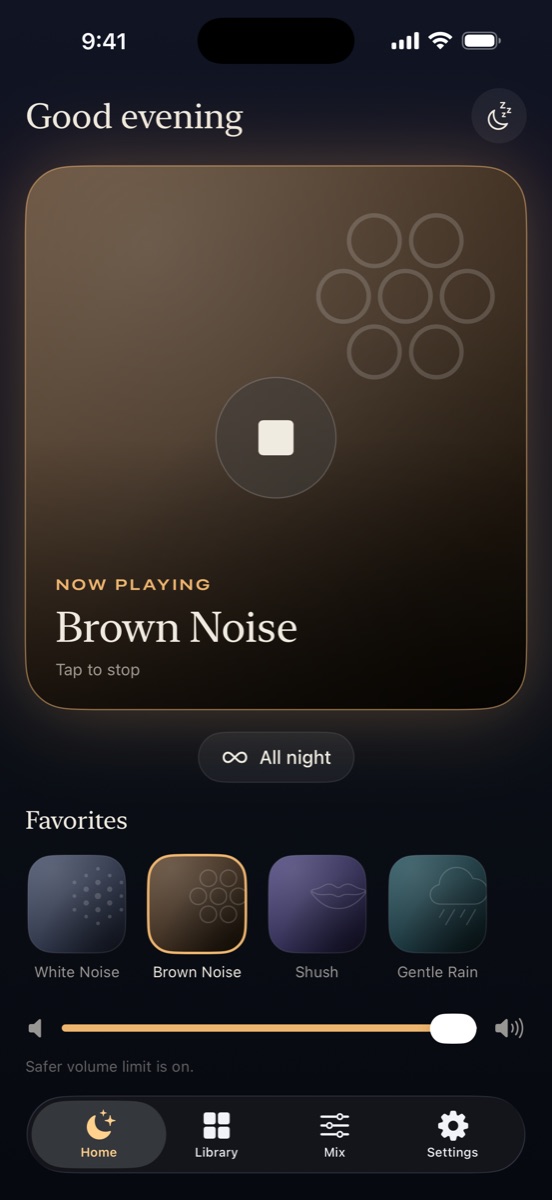
What it does: 12 core sounds free forever, including a Box Fan, White, Pink and Brown noise, Shush and Womb. It plays all night by default and never stops on its own unless you set a timer. It keeps playing through calls, alarms and Siri, pausing and fading back in afterward. No ads, no account, no tracking, and it works offline, so the old-phone setup above works with Wi-Fi off. A safer volume limit is on by default; it caps the app's volume at 60% and suggests placing the phone at least 2 m (about 7 ft) from the crib. That's guidance, not a guarantee, since phones can't measure decibels. A pure-black night screen keeps the room dark. Lifetime is a one-time $9.99 with no subscription.
What it doesn't do: it's not a dedicated device, so it has a phone speaker and depends on your phone being plugged in and silenced. It has no cry detection, no sleep tracking and no Apple Watch app. If you want hardware with one button and no phone involved, a machine is the better fit, and that's a fine choice.
Frequently asked questions
Is a white noise machine better than a phone app?
Neither is better across the board. A machine is a dedicated device with no notifications, while an app is cheaper if you already own a phone and usually offers more sounds and timers.
Can I use my phone as a sound machine for my baby?
Yes, if you set it up like a machine: plugged in across the room, notifications silenced, volume low enough that you can talk normally at the crib, and nothing in the crib.
How much does a Hatch subscription cost?
As of October 2026, Hatch lists Hatch+ at $4.99 a month or $49.99 a year after a 30-day trial. The App Store listing also shows $5.99 and $9.99 monthly and $59.99 yearly options.
What's the best portable sound machine for travel?
For many people it's the phone they're already packing, with an app that works offline. A small portable machine is a good choice if you want something separate from your phone.
Do white noise apps work with the screen off?
Most dedicated sound apps do, but phone browsers usually stop audio when the screen locks. If an app stops overnight, check its battery, Bluetooth and notification settings.